Claude Code 的插件以及 superpowers 介绍
Claude Code 的 plugin,本质上就是一个可分发的能力包,它可以把下面这些能力打包在一起:
skills/:可复用工作流说明;commands/:斜杠命令;hooks/:生命周期钩子;agents/:自定义 subagent;.mcp.json:插件自带的 MCP 配置;.lsp.json:插件自带的 LSP 配置;settings.json:默认设置;.claude-plugin/plugin.json:插件元数据。
Superpowers 就是 Claude Code 的一个 plugin,项目地址:obra/superpowers,当前版本是 5.0.7,它是把一整套开发流程打包进去,它支持 Claude Code,也兼容 Cursor、Codex、OpenCode、GitHub Copilot CLI、Gemini CLI 等环境。
Superpowers 介绍
Superpowers 安装后在我本地的路径如下 ~/.claude/plugins/cache/claude-plugins-official/superpowers/5.0.7/,下面是把和 Claude Code 相关的内容列了出来(因为里面还有 codex, cursor 等其他工具的文件),这个插件没有使用 MCP 和 LSP,这两个是可选的。
superpowers/
├── .claude-plugin/
│   └── plugin.json
├── skills/
│   ├── brainstorming/
│   ├── dispatching-parallel-agents/
│   ├── executing-plans/
│   ├── finishing-a-development-branch/
│   ├── receiving-code-review/
│   ├── requesting-code-review/
│   ├── subagent-driven-development/
│   ├── systematic-debugging/
│   ├── test-driven-development/
│   ├── using-git-worktrees/
│   ├── using-superpowers/
│   ├── verification-before-completion/
│   ├── writing-plans/
│   └── writing-skills/
├── hooks/
│   ├── hooks.json
│   ├── run-hook.cmd
│   └── session-start
├── commands/
│   ├── brainstorm.md
│   ├── write-plan.md
│   └── execute-plan.md
├── agents/
│   └── code-reviewer.md
├── AGENTS.md -> CLAUDE.md
└── CLAUDE.md
superpowers 的工作流程
它的主逻辑大概是这样:
- SessionStart hook 启动;
- hook 把
using-superpowersskill 的内容注入当前会话; - 这个 skill 告诉 Claude:碰到任务先检查 skill;
- Claude 后续根据任务去用
brainstorming、writing-plans、systematic-debugging、test-driven-development等 skill; - 需要 review 时,再由 skill 调用
code-revieweragent;
plugin.json 插件身份证
plugin.json 文件是 plugin 声明插件元数据使用的,包含插件的名字,描述,作者,版本等等,它是插件的 manifest
skills/ 这个插件的核心
Superpowers 的核心几乎都在 skills/ 里,skill 是给模型的一套可复用做事方法,它的用法是在对话里提到它、让它使用这个 skill,或者让系统自动触发。
下面是 superpowers 的所有 14 个 skill:
| skill | 主要做什么 |
|---|---|
using-superpowers |
会话一开始注入的总规则,要求 Claude 先判断有没有相关 skill 可以用。 |
brainstorming |
在写代码前先澄清需求、问问题、给方案、写 spec。 |
using-git-worktrees |
为功能开发准备隔离 worktree 和新分支。 |
writing-plans |
根据 spec 写详细的实现计划。 |
subagent-driven-development |
推荐的执行方式,按 task 派 fresh subagent 并逐步 review。 |
executing-plans |
不派那么多 subagent,直接在当前会话中按计划执行。 |
test-driven-development |
写功能或修 bug 时强制先写 failing test。 |
systematic-debugging |
遇到 bug 或测试失败时先找 root cause,再修。 |
requesting-code-review |
阶段性完成后请求 code review。 |
receiving-code-review |
收到 code review 后先验证,再决定怎么处理。 |
verification-before-completion |
在说 done、fixed、passing 之前先重新跑验证命令。 |
finishing-a-development-branch |
做完之后决定 merge、PR、保留还是丢弃工作分支。 |
dispatching-parallel-agents |
多个独立问题可以并行时,派多个 agent 一起做。 |
writing-skills |
给维护者自己写 skill、改 skill、测 skill 用的元 skill。 |
如果是初始做一个项目,一般的 skill 接力顺序大概会如图所示:
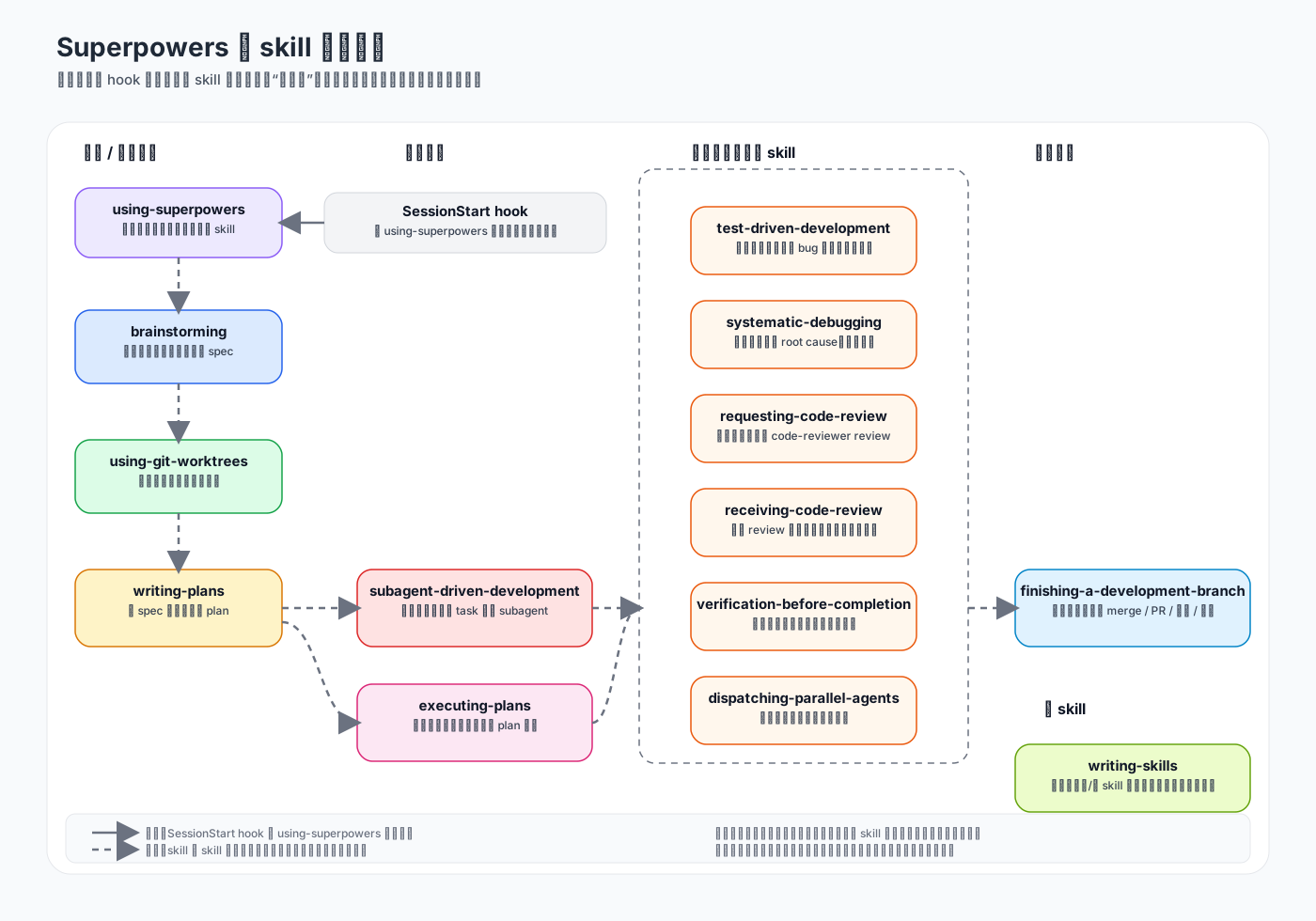
注意这里最关键的一点是:
这套顺序不是程序里写死的状态机,而是通过 SessionStart hook 注入
using-superpowers,再加上每个 skill 自己提示词里写明“什么时候必须用我、下一步该用谁”来驱动出来的。
下面给出 skill 之间的流传的出处说明。
using-superpowers → brainstorming 的触发来源,不只是靠需求描述去”猜”什么时候用 brainstorming,而是 using-superpowers 里的流程图里写死了触发条件。文件:skills/using-superpowers/SKILL.md
"About to EnterPlanMode?" -> "Already brainstormed?";
"Already brainstormed?" -> "Invoke brainstorming skill" [label="no"];
即:每次即将进入 plan 模式,而且还没做过 brainstorm,就必须先触发 brainstorming。
brainstorming -> writing-plans 这个跳转是整个主流程里写得最死的一个。brainstorming 不只是说“设计完以后可以考虑写计划”,而是把它写成了唯一允许进入的下一步。文件:skills/brainstorming/SKILL.md
The terminal state is invoking writing-plans. Do NOT invoke frontend-design, mcp-builder, or any other implementation skill. The ONLY skill you invoke after brainstorming is writing-plans.
using-git-worktrees 的位置,更多来自 README 里的基础 workflow,而不是某一个 skill 文件里写死的“下一跳”。文件:README.md
brainstorming - Activates before writing code.
using-git-worktrees - Activates after design approval. Creates isolated workspace on new branch, runs project setup, verifies clean test baseline.
writing-plans - Activates with approved design.
writing-plans -> subagent-driven-development / executing-plans,writing-plans 里对后续执行方式写得也很明确:plan 写完之后,要么走推荐的 subagent 路线,要么在当前会话 inline 执行。
文件一:skills/writing-plans/SKILL.md
Every plan MUST start with this header:
For agentic workers: REQUIRED SUB-SKILL: Use superpowers:subagent-driven-development (recommended) or superpowers:executing-plans to implement this plan task-by-task.
文件二:skills/writing-plans/SKILL.md
If Subagent-Driven chosen:
- REQUIRED SUB-SKILL: Use superpowers:subagent-driven-development
If Inline Execution chosen:
- REQUIRED SUB-SKILL: Use superpowers:executing-plans
subagent-driven-development 它把自己依赖的工作流 skill 明确列出来了。
文件:skills/subagent-driven-development/SKILL.md
Required workflow skills:
- superpowers:using-git-worktrees - REQUIRED: Set up isolated workspace before starting
- superpowers:writing-plans - Creates the plan this skill executes
- superpowers:requesting-code-review - Code review template for reviewer subagents
- superpowers:finishing-a-development-branch - Complete development after all tasks
Subagents should use:
- superpowers:test-driven-development - Subagents follow TDD for each task
Alternative workflow:
- superpowers:executing-plans - Use for parallel session instead of same-session execution
这里能看出几件事:
using-git-worktrees在这里被当成执行前提;requesting-code-review在这里被当成执行链条的一部分;test-driven-development则被要求交给子代理去遵守;- 最后还把
executing-plans列成备选工作流。
subagent-driven-development -> finishing-a-development-branch,除了上面那段 Integration 列表之外,这个 skill 的流程图和正文也明确把收尾 skill 写出来了。
文件:skills/subagent-driven-development/SKILL.md
“Dispatch final code reviewer subagent for entire implementation” -> “Use superpowers:finishing-a-development-branch”;
也就是说,subagent 路线做完所有 task、review 完总实现之后,终点还是进入 finishing-a-development-branch。
executing-plans -> finishing-a-development-branch,inline 路线也一样,不是执行完 plan 就结束,而是明确要求进入收尾 skill。
文件:skills/executing-plans/SKILL.md
After all tasks complete and verified:
- Announce: “I’m using the finishing-a-development-branch skill to complete this work.”
- REQUIRED SUB-SKILL: Use superpowers:finishing-a-development-branch
- Follow that skill to verify tests, present options, execute choice
所以不管你走的是 subagent-driven-development 还是 executing-plans,最后都会落到 finishing-a-development-branch。
systematic-debugging → test-driven-development,调试的 Phase 4 第一步明确要求用 TDD skill 写失败测试。文件:skills/systematic-debugging/SKILL.md
Create Failing Test Case … Use the
superpowers:test-driven-developmentskill for writing proper failing tests
systematic-debugging → verification-before-completion,同一文件的 Related skills 段落直接列出了这个依赖。文件:skills/systematic-debugging/SKILL.md
superpowers:verification-before-completion - Verify fix worked before claiming success
这些跳转不是集中写在同一个地方,有的写在 skill 正文里,有的写在 plan header 模板里,有的写在 “Integration / Required workflow skills” 段落里。它们拼起来,才形成完整工作流。
skill 目录下的脚本
有些 skill 目录下还带了脚本文件,它们是 这个 skill 自带的辅助工具。
brainstorming/scripts/ 是最特别的一组,因为 brainstorming 下面还有一个 visual-companion.md,它想在需要时拉起一个本地临时网页,用来辅助做视觉化的 brainstorm。这里几个文件大概分工是:
start-server.sh:启动本地 brainstorm server,返回访问 URL;server.cjs:真正的 HTTP + WebSocket 服务端;helper.js:注入浏览器页面,负责把点击事件和页面刷新通过 WebSocket 回传;frame-template.html:页面外壳模板;stop-server.sh:停掉这个临时 server。
所以这套脚本不是用来驱动 skill 跳转的,而是给 brainstorming 提供一个可选的视觉协作界面。
systematic-debugging/find-polluter.sh 的用途是:在一堆测试里排查到底是哪一个测试制造了额外文件、目录或者状态污染。这个脚本服务于 systematic-debugging 里的 root cause tracing。
writing-skills/render-graphs.js 这是给维护者写 / 改 skill 时用的工具。它会读取某个 skill 的 SKILL.md 里的 Graphviz dot 图,然后渲染成 SVG。也就是说,这个脚本服务于 writing-skills 这个元 skill,方便把 skill 内部流程图可视化。
hooks/ 注入规则
hooks/ 文件夹下是这 3 个文件:
hooks/hooks.json:钩子的注册文件,这个文件注册了一个 SessionStart hook,在startup|clear|compact这些时机会同步执行"${CLAUDE_PLUGIN_ROOT}/hooks/run-hook.cmd" session-start;hooks/run-hook.cmd:一个跨平台 wrapper,Windows 下负责找 bash 再执行真正的 hook 脚本,Unix / macOS 下直接用 bash 去跑目标脚本;hooks/session-start:真正的 SessionStart 逻辑,它会定位插件根目录、读取skills/using-superpowers/SKILL.md、做 JSON 转义,并按 Claude Code / Cursor / Copilot CLI 等不同平台输出不同格式的 additional context。
这就是它为什么“装上之后突然很有流程感”的关键原因之一,因为它不是等你做错了再纠正,而是在会话开始时就先通过 using-superpowers 这个 skill 告诉 Claude:
- 先检查有没有相关 skill;
- 如果 skill 适用,就必须先用 skill;
- 用户指令优先于 skill;
- 后面的 brainstorming、debugging、TDD 这些都要按流程来。
agents/ 插件的 subagent
这个目录下只有一个文件 agents/code-reviewer.md,这个 code-reviewer subagent 定义了:
- 这个 agent 什么时候该用;
- 负责 review 什么;
- 要按什么维度输出结果;
- 问题怎么分级。
requesting-code-review 这个 skill 会明确要求:在合适的时候 dispatch 这个 code-reviewer subagent,也就是说 skills/ 决定流程,agents/ 提供流程里要调用的专门角色。
commands/ 已废弃
在 Claude Code 里 commands/ 里的东西才是斜杠命令,superpowers 里其实没有斜杠命令了,这个文件夹下的三个文件构成的命令都会告诉你当前命令已废弃,请用相对应的 skill。